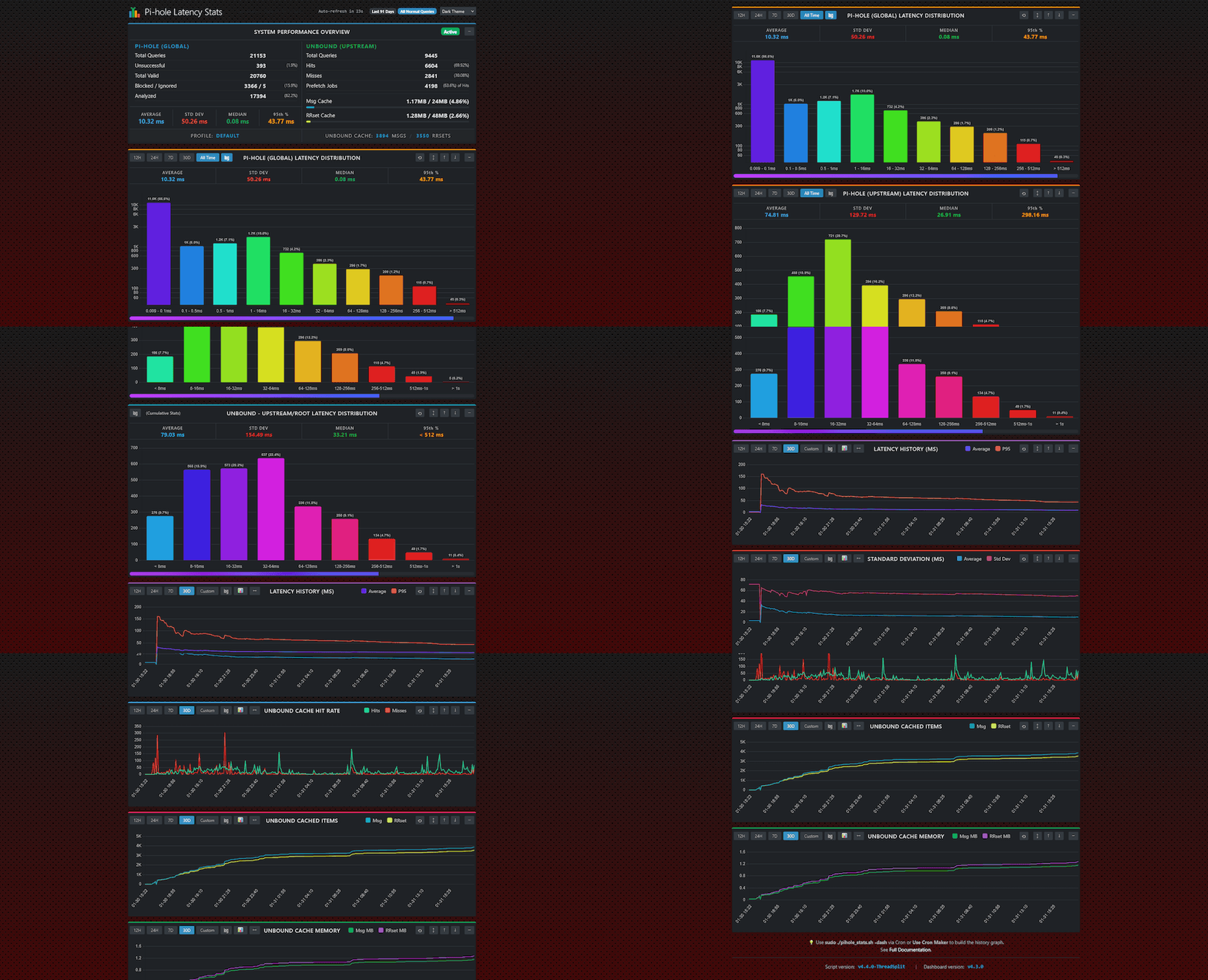
Pi-hole Latency Stats is a lightweight, zero-dependency Bash script that analyzes your Pi-hole’s performance. It calculates latency percentiles (Median, 95th), groups query speeds into “Tiers” (buckets), and—optionally—monitors your Unbound recursive DNS server statistics and memory usage.
This tool helps you answer: “Is my DNS slow because of my upstream provider, or is it just my local network?” and “Is Unbound performing efficiently?”
Features
- Latency Analysis: Calculates Average, Median, and 95th Percentile latency.
- Tiered Grouping: Groups queries into buckets (e.g., <1ms, 10-50ms) to easily spot outliers.
- Horizontal Dashboard: Automatically switches to a split-pane “Dashboard View” (Pi-hole Left, Unbound Right) on wide terminals (>100 columns).
- Domain Filtering: Supports Wildcards (
*,?). - Unbound Integration: Auto-detects Unbound to report Cache Hit Ratio, Prefetch jobs, and Cache Memory Usage.
- Deep Cache Inspection: Optionally counts the exact number of Messages and RRsets in Unbound’s RAM (
-ucc). - Snapshot Mode: Safely copies the database before analysis to prevent “Database Locked” errors. Includes Smart RAM Safety to choose between RAM (fast) or Disk (safe) snapshots automatically.
- Locale Safe: Forces standard formatting to prevent crashes on non-English systems (fixes comma vs dot decimal issues).
- Flexible Filtering: Filter by time (last 24h, 7 days), specific date ranges (
-from,-to), status (Blocked/Forwarded), or specific domains. - JSON Support: Native JSON output for dashboards (Home Assistant, Grafana, Node-RED).
- Resilient: Handles database locks (waits if Pi-hole is writing) and strictly validates arguments.
- Configuration Profiles: Define default arguments inside the config file to create preset “Profiles” that override CLI flags.
- Sequential Saving: Automatically number your saved reports (e.g.,
report_1.txt) to prevent overwrites. - Auto-Cleanup: Built-in log rotation to delete old report files automatically.
- Flexible Paths: Load configurations and save reports to any folder on your system.
- Zero Dependencies: Uses standard tools (
sqlite3,bc,awk,sed) pre-installed on most Pi-hole distros.
Requirements
- Pi-hole (v5 or v6)
sqlite3(usually installed by default)- (Optional)
unboundandunbound-host(for Unbound statistics)
Usage
You can run the script with various flags to customize the analysis.
sudo ./pihole_stats.sh [OPTIONS]
🕒 Time Filters
-24h: Analyze the last 24 hours (Default).-7d: Analyze the last 7 days.-<number>h: Analyze the last N hours (e.g.,-12h).-<number>d: Analyze the last N days (e.g.,-30d).-from "date": Start analysis from a specific date/time (e.g.,-from "yesterday",-from "2024-01-01").-to "date": End analysis at a specific date/time (e.g.,-to "2 hours ago",-to "14:00").
🔍 Query Modes
- Default : Analyzes all “normal” queries (Forwarded + Cached).
-up: Upstream Mode. Analyzes only queries forwarded to upstream DNS (Cloudflare, Google, Unbound). Use this to test your ISP/Provider speed.-pi: Pi-hole Mode. Analyzes only cached/local answers. Use this to test the speed of the Pi-hole hardware itself.-nx: Exclude Blocked. Removes blocked queries (0.0ms) from the calculation to prevent skewing the average.
🎯 Filtering
-dm <string>: Domain Filter. Analyze only domains containing this string (e.g.,-dm googlematchesgoogle.com,drive.google.com).-edm <string>: Exact Domain. Analyze only this exact domain (e.g.,-edm google.com).
📦 Unbound Integration
-unb: Force Unbound. Appends Unbound statistics to the standard Pi-hole report. (Note: The script usually auto-detects this).-unb-only: Unbound Only. Runs only the Unbound health check. This skips the Pi-hole database entirely (faster, useful for checking Unbound status).-no-unb: Disable Unbound. Forces the script to skip Unbound checks, even if detected or enabled in config.-ucc: Cache Count. Counts the exact number of Messages and RRsets in RAM. See Performance Note below.
🖥️ Display Options
-hor,--horizontal: Force Horizontal. Forces the split-pane dashboard view (ideal for large screens).-ver,--vertical: Force Vertical. Forces the standard vertical list view (ideal for mobile/logs).
💾 Output & Automation
-f <filename>: Save to File. Writes the output to the specified file.-j: JSON Mode. Outputs raw JSON instead of the text report.-s: Silent Mode. Suppresses screen output. Essential for cron jobs.-rt <days>: Retention/Rotation. Deletes report files in yourSAVE_DIRolder than X days.-snap: Snapshot Mode. Creates a temporary copy of the DB to avoid “Database Locked” errors. Auto-detects if RAM is sufficient (fast); falls back to disk if needed (safe).
⚙️ Configuration
-c <file>: Load a specific configuration file.-mc <file>: Make (generate) a default configuration file.-db <path>: Manually specify the path topihole-FTL.db.
Configuration File
On the first run, the script creates pihole_stats.conf in the same directory. You can edit this file to permanently set your preferences:
- Define Latency Tiers: Customize your buckets (e.g.,
L01="0.5"for 0.5ms). - Default Save Directory: Set
SAVE_DIRto a folder where-ffiles will be saved automatically. - Unbound Settings: Set
ENABLE_UNBOUNDtoauto(default),true(always on), orfalse. - Visual Layout: Set
LAYOUTtoauto(default),horizontal, orvertical. - Auto-Delete: Set
MAX_LOG_AGEto automatically delete old reports every time the script runs.
🔍 Real-World Use Cases
1. 🐢 Diagnosing “Is it me or the ISP?”
When your internet feels slow, speed tests often lie because they measure bandwidth, not latency. DNS lag is the #1 cause of “snappy” browsing turning sluggish.
- The Test: Compare your Local speed vs Upstream speed.
./pihole_stats.sh -pi(Measures only cached/local answers)-
./pihole_stats.sh -up(Measures only answers from Cloudflare/Google/ISP) - The Insight:
- If
-piis slow (> 10ms): Your Raspberry Pi might be overloaded or using a slow SD card. - If
-upis slow (> 100ms): Your ISP or upstream DNS provider is having issues.
2. 🚀 Optimizing Unbound Performance
If you use Unbound (recursive or forwarding), blind trust isn’t enough. Verify your cache efficiency.
- Benchmark Strategy: Run
./pihole_stats.sh -upto strictly analyze upstream resolution speed. Compare the Average and p95 latency against a standard forwarder like1.1.1.1to see if being recursive is actually worth the speed trade-off. - Tune Cache Efficiency: Check the Cache Hit Ratio in the Unbound panel. If it stays low (< 50%) after 24 hours, consider increasing
cache-min-ttl. - Deep Inspection: Use
./pihole_stats.sh -uccto count the exact number of Messages and RRsets in RAM. This helps verify ifprefetchis effectively keeping popular domains alive.
3. 🕵️ Domain-Specific Debugging
Sometimes specific services (like work VPNs or streaming sites) feel slow while everything else is fine.
- The Test: Filter stats for a specific domain.
./pihole_stats.sh -dm "netflix"(Analyzesnetflix.com,nflxso.net, etc.)-
./pihole_stats.sh -edm "my-work-vpn.com"(Exact match only) - The Insight: You might find that while your average global latency is 20ms,
netflixqueries are hitting Tier 8 (>1000ms), indicating a specific routing issue or blocklist conflict.
4. 📉 Long-Term Health Monitoring
Spot trends before they become problems by automating data collection.
- The Setup: Add the script to Cron to run nightly.
-
./pihole_stats.sh -24h -j -f "daily_stats.json" -rt 30 - The Insight:
- JSON Output: Ingest this into Home Assistant, Grafana, or Node-RED to visualize latency over weeks.
- Auto-Retention (
-rt): Keeps your disk clean by automatically deleting reports older than 30 days.
5. 🛡️ Safe Analysis on Low-End Hardware
Running heavy SQL queries on a Raspberry Pi Zero (512MB RAM) can cause the web interface to freeze or FTL to crash (“Database Locked”).
- The Solution: Snapshot Mode (
-snap). - How it works:
- The script creates a temporary copy of your database.
- It intelligently checks available RAM. If you have space, it copies to RAM (instant). If not, it falls back to Disk (safe).
- All math happens on the copy, leaving your live DNS service completely untouched and lag-free.
Unbound Integration
The script attempts to Auto-Detect Unbound. It checks if:
- Unbound is installed and the service is active.
- Pi-hole is configured to use it.
- Pi-hole v5: Checks
setupVars.confordnsmasq.dconfigs. - Pi-hole v6: Checks
pihole.tomlfor localhost upstreams.
⚠️ Prerequisite for Memory Stats
To see the Memory Usage breakdown (Message vs RRset cache), you must enable extended statistics in Unbound.
- Edit your config:
sudo nano /etc/unbound/unbound.conf(or your specific config file). - Add
extended-statistics: yesinside theserver:block:
server:
# ... other settings ...
extended-statistics: yes
- Restart Unbound:
sudo service unbound restart
Without this setting, Memory Usage will report 0 MB.
⚠️ Performance Note: Unbound Cache Counting (-ucc)
The -ucc flag provides deep insights by counting the exact number of items in your Unbound RAM cache. To achieve this, it triggers a cache dump.
Please use this flag responsibly:
- How it works: Unbound locks its memory to read the data.
- The Impact: While locked, Unbound momentarily pauses DNS resolution.
- For typical home use (1k–50k items), this freeze is instant (milliseconds) and unnoticeable.
-
For very large caches (100k+ items), this can cause a 1–2 second delay in DNS replies.
- Recommendation: Use this flag for periodic reporting (e.g., hourly/daily Cron jobs) or manual spot-checks. Do not run it in a rapid “live” loop (e.g., every 5 seconds).
Understanding the Metrics
Pi-hole Metrics
- Average Latency: The mathematical mean of all query times.
- Median Latency (p50): The “middle” query. 50% of your queries were faster than this.
- 95th Percentile (p95): The “worst case” for most users. 95% of your queries were faster than this; only the slowest 5% took longer.
- Tiers:
- Tier 1 (< 0.1ms): Instant answers. Usually cached by Pi-hole or Blocked.
- Tier 2-4 (1ms - 50ms): Healthy upstream responses.
- Tier 7+ (> 300ms): Slow queries. These might be timeouts or packet loss.
Unbound Metrics
- Cache Hit Ratio (CHR): The percentage of queries answered purely from Unbound’s RAM. Higher is better (usually >80% after a few days).
- Prefetch Jobs: The number of times Unbound refreshed a cached item before it expired. This means the client got an instant answer instead of waiting.
- Cache Memory Usage: Shows how much RAM is actually being used vs the limit you set in
msg-cache-sizeandrrset-cache-size. - Cache Count (
-ucc): A deep inspection of the items currently locked in RAM. - Messages: The number of cached questions (e.g., “What is the IP of google.com?”).
- RRsets: The number of cached records/answers (e.g., “A Record: 192.168.1.1”). One Message can link to multiple RRsets (like CNAME chains).
Automated Reports (Cron)
To generate a daily report at 11:55 PM and auto-delete logs older than 30 days:
# Open crontab
crontab -e
# Add this line:
55 23 * * * /home/pi/pihole_stats.sh -24h -j -f "daily_stats.json" -rt 30 -s
ℹ️ Layout Note: When running via Cron, the script cannot detect a screen width and will automatically default to the Vertical layout for text reports. This ensures logs are readable and don’t wrap incorrectly.
- JSON output is structured data and is never affected by layout settings.
- If you specifically require a wide text report from Cron, you can force it by adding
-horto the command.
Example Output
Click to expand Text Report (Horizontal Layout)
*Automatically generated on terminals wider than 100 columns (or with `-hor`).*
Click to expand Text Report (Vertical Layout)
*Standard layout for mobile, cron logs, or `-ver` flag.*
Click to expand JSON Structure
{
"version": "3.1",
"date": "2026-01-20 12:30:00",
"time_period": "All Time",
"mode": "All Normal Queries",
"stats": {
"total_queries": 165711,
"unsuccessful": 2840,
"total_valid": 162871,
"blocked": 23329,
"analyzed": 139542
},
"latency": {
"average": 6.55,
"median": 0.03,
"p95": 14.96
},
"tiers": [
{"label": "Tier 1 (< 0.009ms)", "count": 11032, "percentage": 7.91},
{"label": "Tier 2 (0.009 - 0.1ms)", "count": 93433, "percentage": 66.96},
{"label": "Tier 3 (0.1 - 1ms)", "count": 22286, "percentage": 15.97},
{"label": "Tier 4 (1 - 10ms)", "count": 4703, "percentage": 3.37},
{"label": "Tier 5 (10 - 50ms)", "count": 4671, "percentage": 3.35}
],
"unbound": {
"status": "active",
"total": 37129,
"hits": 27513,
"miss": 9616,
"prefetch": 16437,
"ratio": 74.10,
"memory": {
"msg": { "used_mb": 3.29, "limit_mb": 64.00, "percent": 5.13 },
"rrset": { "used_mb": 3.51, "limit_mb": 128.00, "percent": 2.74 }
},
"cache_count": {
"messages": 288,
"rrsets": 486
}
}
}